For International Travelers
Bring your passport and driver's license—Taiwan is yours to explore.
Why choose us
2,000+ Locations Across Taiwan
From airports and metro stations to shopping districts, our extensive network makes pickup and return effortless.
Flexible Pricing—Pay Only for What You Use
Pay by time and mileage. Charges are automatically billed after return
24/7 Emergency Support
Our support team is available around the clock whenever you need help on the road.
Eligibility
International visitors with valid documents can apply and book online—no service counter required.
⚠️Don't wait until rental day to apply! Review takes about one business day. Apply at least two days in advance.

Valid Passport
A valid passport issued by your home country

Domestic Driver's License
A valid driver's license from your home country

Proof of Entry
A valid document showing your most recent date of entry into Taiwan.

Selfie Photo
Upload a clear selfie for identity verification
Credit Card
Link a credit card for application and automatic payment
*Please carry the original physical documents required for the rental at all times.
Get Started in 3 Easy Steps

Download App , upload your passport, home-country driver’s license, International Driving Permit (IDP), proof of entry and selfie, then link a credit card to apply online.
Apply early — once approved, you're ready to drive.


Select a location, time and vehicle in the app, then proceed to the designated pickup point.
In-app Navigation to the Location

At the location, photograph and confirm the vehicle condition in the app, then start your trip.
Fully Self-Service—No Counter Needed
Pickup & Return Guide
Open App and confirm your booking details and pickup location.

Use the app map to navigate to the location and find your reserved vehicle.

Follow the app and take pictures from the four corners of the car (including the license plate)

Click “Unlock” and start using.

Roundtrip: return to your original station. Floating: park in a legal roadside spot.
Park in the designated area.

Check carefully for damage and dents and upload Inspection.

After return, the rental fee will be charged to your linked credit card.
⚠️ Check the fuel level before return. Overdue returns are charged at the standard rate. To extend, apply in advance via the app.
Rates
Rates vary by vehicle type. Please refer to the App for the leatest official announcements.
| Fee Item | Billing Method | Notes |
|---|---|---|
| Rantal rate (Weekday) Monday–Friday, excluding national holidays |
Promotional hourly rate by vehicle Approx. NT$112–280/hour |
Required |
| Rantal rate (Holiday) Saturday, Sunday and national holidays |
Promotional hourly rate by vehicle Approx. NT$168–380/hour |
Required |
| Mileage Fee | NT$3.4–3.5/km | Required |
| eTag(toll fees) | Collected on your behalf | Collected on your behalf |
| Safety package | NT$45-120/hour based on cumulative rental hours | Varies by Route |
※ For continuous rentals of 10–24 hours, the rate is calculated based on 10 hours (Daily Billing Limit: 10 hours)
※ Rates shown in the app on the pickup date apply. Listed rates apply during Lunar New Year.
※ All charges are automatically billed to the linked credit card after return.
※ Estimate excludes ETag tolls. Please refer to the App for the leatest official announcements. Actual charges shown in the app prevail.

Driving in Taiwan for the First Time? Add the Safety package
Add the Satety package, in the event of vehicle damage , subject to the applicable conditions, you will be exempt from the following charges specified of the Rental Agreement and loss-of-use charges.
New Member Rate From
Driving in Taiwan
read the details before departure.
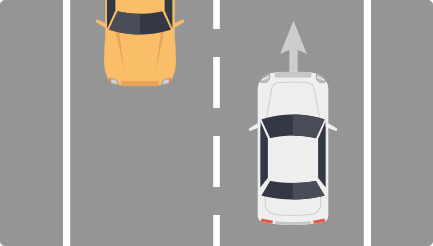
Left-Hand Drive, Keep Right
The driver's seat is on the left; vehicles drive on the right side of the road.

Traffic Signal Rules
Do not turn right on red. Follow directional traffic signals.
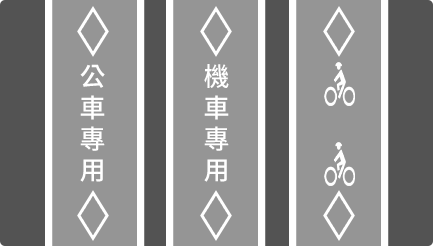
Dedicated Lanes
Bus, scooter, and bicycle lanes are for designated vehicles only.
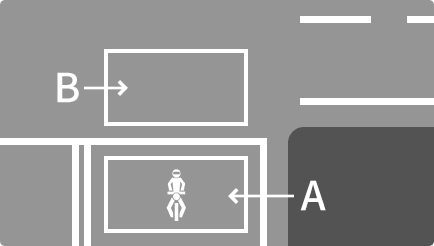
Two-Stage Turn Boxes
A is the waiting area; B is the two-stage turn area.
Keep right. This is opposite to Hong Kong, the UK and Japan—take extra care.
Scooter lanes are common on the right at intersections. Cars must stay out of them.
Speed cameras are common. Observe speed limits — any fines will be charged to the renter, as iRent forwards them accordingly.
Zero tolerance for drunk driving. Taiwan enforces strict DUI laws, with heavy fines and possible detention.
Red curb: No parking at any time; violators may be fined and towed.
Yellow curb: Restricted parking during specified times or conditions; check roadside signs.
Use Google Maps to find legal parking nearby. Parking fees are the renter's responsibility.
iRent will transfer parking fines to the renter. Please park legally.
A fuel card is provided for CPC, Formosa and National Petroleum stations across Taiwan; fuel is included.
Before returning, make sure the fuel level is sufficient; low fuel may affect the next customer.
For EVs, follow the app to a designated charging station for charging.
Taiwan's highways use electronic toll collection (ETag). The vehicle is equipped with ETag; tolls are billed after return.
Highways generally have a 110 km/h speed limit. The renter is responsible for speeding fines.
Use Google Maps to plan routes and check whether highways are required.
Google Maps / Apple Maps support navigation in Taiwan. Download offline maps in advance.
Use Google Lens to instantly translate unfamiliar Chinese signs.
Emergency Numbers: 110 (Police) | 119 (Ambulance) | iRent Support (24/7 in the App)
Immediately call 110 to contact the police and obtain a police accident report, which is required for Safety package claims.
After calling the police, contact iRent support immediately in the app. We will guide you through the process.
Do not settle privately, as this may affect your Safety package claims eligibility.
We're Here for You
01
Chinese & English Support
Our bilingual support team is available around the clock, so language is never a barrier.
02
Roadside Assistance
For breakdowns, flat tires or other issues, contact iRent and we will arrange roadside assistance.
03
Accident Assistance
If an accident occurs, call the police for documentation, then contact iRent for step-by-step assistance.

Police
110

Ambulance
119

iRent Support
24/7 Support in the App
Download iRent and apply now—your Taiwan road trip starts here.
1.Taiwan law requires drivers to carry these original physical documents while
driving. Failure to do so may result in law enforcement fines and affect insurance coverage.
2.iRent car rental services for foreign travelers are open to applicants of all nationalities. To ensure service quality, however, APP download and overseas connectivity features will be rolled out in phases.
Currently, APP download and overseas connectivity are supported in the following countries and regions: Macau, Japan, South Korea, the United States, Malaysia, Singapore, Indonesia, the Philippines, and Thailand.
Users in countries or regions not on this list may be unable to download the APP or complete membership registration locally for the time being. Any future additions will be announced on this webpage.
3.The English version is provided for reference only. The Chinese version shall prevail in case of any discrepancies
between the English and Chinese versions.